

Our journey through the capabilities of CenterTest carries on. As we established in our previous articles, CenterTest can perform both UI and API testing within a single suite. Now, we will explore the power of Excel-based data-driven testing within CenterTest, which enhances the testing process with flexible and efficient test data management.
Leveraging Excel in Data-Driven Testing
CenterTest's data-driven testing capability enables using Excel files as test data sources. This allows executing the same test with various inputs, improving test coverage and efficiency, and aiding in more robust error detection. CenterTest's ability to generate a sample Excel file based on a hard-coded test and its subsequent data access layer, makes it an excellent tool for data-driven testing.
1. Sample Excel File Generation
CenterTest simplifies the initial setup of data-driven testing by creating a sample Excel file based on a hard-coded test. This hard-coded test provides the structure for the test data, and the generated Excel file mirrors this structure, including fields for every value set in the test.
This automatically generated Excel file is not intended to provide test data for actual test execution. Instead, it acts as a structured template where testers can input custom test data, including the ability to use Pairwise test data generation. Testers can extend this template with various data sets based on the scenarios they want to test.
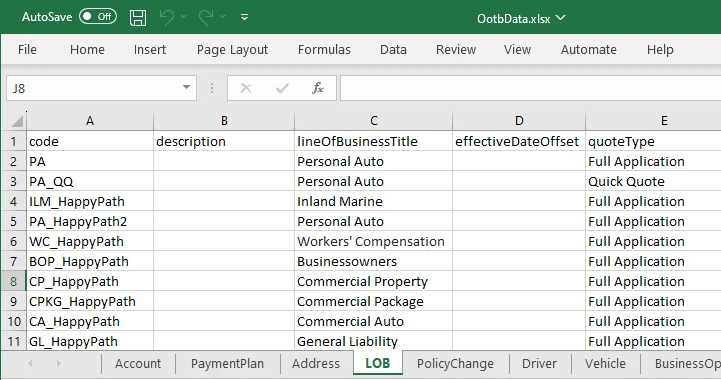
2. Structuring Excel Files for Efficient Testing
CenterTest allows testers to use multiple tabs within the Excel file to logically group related data sets. This organization facilitates efficient data management, as testers can quickly locate and modify data sets based on their needs.
3. Data Access Layer Generation
After setting up the Excel file with appropriate test data, CenterTest provides an abstraction layer for data access. This layer features simple getter methods that fetch data from the Excel file, providing an easy way to incorporate this data into the test cases.
Implementing Excel-Based Data-Driven Testing with CenterTest
With the features above, executing Excel-based data-driven testing with CenterTest involves the following steps:
Hard-coded Test Creation: First, create a hard-coded test that defines the structure of your test case.
Sample Excel File Generation: Run the built-in feature in CenterTest to generate a sample Excel file based on your hard-coded test.
Test Data Input: Use the generated Excel file to input your own test data. Extend the data rows with different data sets for the various test scenarios. If needed, separate related data sets into different tabs for easier data management.
Data Access Layer Generation: Use the provided feature in CenterTest to generate an abstraction layer for your test data file. This abstraction layer will allow your test case to access the data from the Excel file.
Test Execution: When running the test, CenterTest will use the getter methods to pull data from the Excel file and populate the test case. This allows the same test to be run multiple times with different data sets.
Test Reporting: After execution, CenterTest provides a comprehensive report detailing the results for each data set, enabling easy identification of complex data and analysis of system behavior under different conditions.
In conclusion, CenterTest's ability to integrate Excel-based data-driven testing into its combined UI and API testing capabilities further elevates its efficiency and versatility in software testing. This functionality, paired with the convenience of automatically generating a sample Excel file and a data access layer, truly sets CenterTest apart in modern software testing.
Recent Updates


Explore CenterTest
Ready to elevate your QA practice?
Guidewire test automation,
- Guidewire test automation, that's easy to maintain.
- Guidewire test automation, in just two weeks.
- Guidewire test automation, future-proofed for cloud.