

As we continue to unpack the unique capabilities of CenterTest, we've come to appreciate how this revolutionary testing framework adeptly integrates both UI and API testing into a single suite while harnessing the power of data-driven testing. Now, let's turn our focus to yet another exceptional feature of CenterTest: its robust handling of Chrome DevTools data, storing it in a database for enhanced software testing insights.
The Intersection of Chrome DevTools and Databases
Chrome DevTools, embedded within the Google Chrome browser, is an invaluable set of web developer tools. It provides a wealth of data about a web application’s interaction and performance metrics, ranging from network requests and responses to performance profiling and console logs.
CenterTest leverages the richness of this data and goes a step further. It captures this data and stores it in a database of your choice during test execution, persisting the data for future analysis and comparisons.
CenterTest's Chrome DevTools Data Storage: An Unparalleled Advantage
The ability of CenterTest to collect and store Chrome DevTools data in a designated database provides several notable benefits:
Persistent Data Access: Storing Chrome DevTools data in a database ensures it is preserved beyond the duration of a test session. This persistency enables trend analysis over time or comparison between different test runs.
Customized Storage Solution: CenterTest's flexibility to store data in a database of your choice allows you to integrate the test results seamlessly into your existing data management workflows and tools.
Improved Test Insights: The stored data, coupled with CenterTest's test results, provides a comprehensive perspective on the application's performance and behavior under various testing conditions.
Efficient Debugging: Having access to historical data can expedite the debugging process by providing a broader context to identify when and why an issue might have started.
Implementing Chrome DevTools Data Storage in CenterTest
Harnessing this Chrome DevTools data storage feature in CenterTest involves straightforward steps:
Database Connection: Specify the connection details of the desired database in CenterTest's settings. The database will serve as the repository for the DevTools data.
Test Execution: As tests are run in CenterTest using Google Chrome as the browser, it automatically captures the DevTools data in real-time. Adding that functionality can be done with simple code snippet:
var driver = new ChromeDriver();
var devTools = driver.getDevTools();
devtools.createSession();
devTools.send(Network.enable(Optional.empty(), Optional.empty(), Optional.empty()));
devTools.addListener(Network.requestWillBeSent(), requestData::add);
devTools.addListener(Network.responseReceived(),  responseData::add);
Data Storage: CenterTest pushes the collected data to the designated database, storing it alongside the corresponding test result data. All data is retrieved from requestData and responseData lists filled with information in previous step
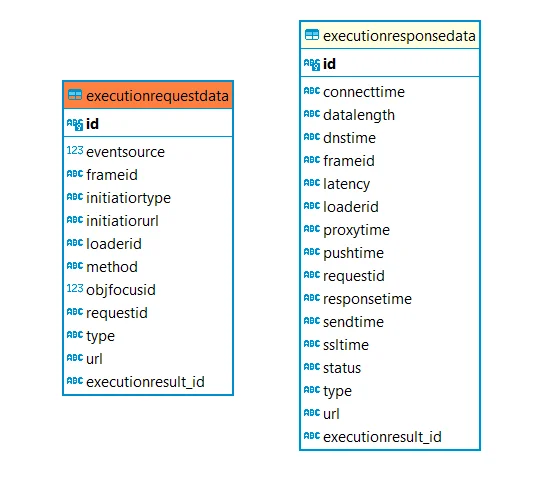
Data Analysis: Post-test execution, you can access the stored data from your database for detailed analysis, identifying trends, and debugging potential issues.
By seamlessly integrating the data power of Chrome DevTools with the convenience of customized database storage, CenterTest has once again demonstrated its commitment to delivering an end-to-end, efficient, and data-rich testing solution. This feature further solidifies CenterTest's standing as a must-have tool in the modern software testing landscape, providing testers with unprecedented access to historical test data and insights.
Recent Updates


Explore CenterTest
Ready to elevate your QA practice?
Guidewire test automation,
- Guidewire test automation, that's easy to maintain.
- Guidewire test automation, in just two weeks.
- Guidewire test automation, future-proofed for cloud.