

CenterTest's Multi-User/Multi-Session processing revolutionizes test automation for InsuranceSuite by allowing real-world, sophisticated end-to-end testing across PolicyCenter, BillingCenter, and ClaimCenter, which is not possible within Guidewire's GT framework.
Sophisticated applications like Guidewire (GW) InsuranceSuite involve complex workflows that span multiple user roles and system interactions. Traditional single-user, single-session automated tests fall short of replicating these real-world scenarios, which can lead to missed bugs, unexpected user experiences, and ultimately, decreased software quality.
Multi-User/Multi-Session capabilities ensure that test automation is ready to meet the demanding realities of real-world workflows. By catching multi-user issues early in the development cycle, companies can avoid costly post-release fixes and enhance customer satisfaction.
Kimputing addresses this challenge through the integration of Multi-User/Multi-Session processing as a core feature of our CenterTest automation solution.
Multi-User/Multi-Session processing with integrated Data Helpers enable a single test to start multiple sessions, with each session being connected to a specific user. For UI testing, a session commonly refers to a browser being opened, but can refer to any connections including API calls or external endpoints such as internal systems or webservices.
Example of Multi-User/Multi-Session processing in action:
Inside a single, comprehensive end-to-end test with CenterTest, you can have a producer creating a policy in the Producer Engage portal, an underwriter issuing the identified policy in PolicyCenter, a claims adjuster creating a claim against that policy in ClaimCenter, and a billing representative making a payment adjustment in BillingCenter. Four different systems (PE, PC, CC, BC), with four different roles.
Why It Matters
The ability to run automated tests in multiple browsers with different users simultaneously offers many advantages:
Realism: Real-world applications often involve multiple users interacting with the system concurrently. CenterTest mirrors this reality, providing a more accurate representation of how the software will be used in production.
Complex workflows: Many business processes, especially for Commercial LOBs, require different user roles and multiple interactions. Multi-user testing allows us to automate these complex scenarios, ensuring that all parts of the process work together seamlessly. This is especially critical when performing role and permission testing.
Improved coverage: Test complex, multi-user scenarios that were previously impossible to automate - or cumbersome and time consuming to test manually. By simulating various user roles and interactions, we can uncover issues that might be missed in simpler automated testing scenarios.
Efficiency: Instead of running multiple separate tests and manually chaining them together, you can combine complex workflows into a single, comprehensive test case. This not only saves time, it also ensures that the entire process is tested as a single scenario.
Scalability testing: Multi-user testing allows us to simulate high-load scenarios, helping identify performance bottlenecks and concurrency issues early in the development process.
Enabling automation of complex, multi-user scenarios expands test coverage beyond what is possible with manual testing and enhances confidence in your InsuranceSuite implementation. This approach helps detect and resolve complex issues unique to multi-user environments, which might otherwise go unnoticed until post-deployment and potentially compromise user experience.
The gained efficiency directly contributes to more frequent and reliable software releases by accelerating the software development cycle and decreasing maintenance costs. Moreover, this testing approach reduces extensive manual user acceptance testing, further reducing costs and resources.
How It Works
Users
CenterTest defines different user roles (e.g., producer, underwriter) in a single runtime property file. You can also create multiple runtime property files as needed to fit your specific testing needs.
User properties relate a generic role to the actual username and password for any environment. For example, your "underwriter" might be John Doe in your DEV environments but Susan Smith in QA environments, or you could have "producer" Bill Hearst with different passwords for DEV and QA:
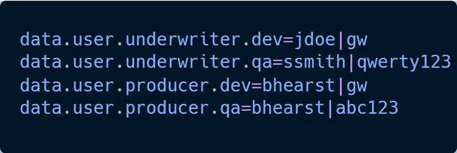
User roles by environment
Contexts:
CenterTest allows multi-user, multi-Center tests to emulate real-life scenarios where multiple users are required to operate through the complete workflow. For example, a producer creates a policy in PolicyCenter, an underwriter approves it in PolicyCenter, and an customer service rep creates a claim in ClaimCenter.
Single-User/Multi-Session:
Users are created when defining an InvocationContext variable for different steps in the test. A unique User Identifier lets you use the same user in multiple sessions. For example, you can use a defined producer user, but there will be two separate sessions for PolicyCenter and ClaimCenter:

InvocationContext for a single producer role logging in to multiple Centers.
Multi-User/Multi-Session:
The InvocationContext variable can define any number of different users that can be used to interact with Centers. If the user will interact only with one session, then you do not need a UserIdentifier.
In this example, we still have producer logging in to PolicyCenter and ClaimCenter, but we also have an underwriter logging in to ClaimCenter only. Note the lack of ".withUserIdentifier" on line three:

InvocationContext for multiple roles logging in to multiple Centers.
Consider an InsuranceSuite scenario, like the one above, where producers and underwriters interact within the same workflow. Each role might perform actions in isolation or in parallel, necessitating distinct browser sessions to accurately simulate real-world interactions.
This complexity involves effectively managing both multiple browser instances and different user contexts. By distinguishing user contexts like 'producer' and 'underwriter', each with unique identifiers as needed, CenterTest mimics real-life workflows and enables comprehensive automation to dramatically decrease test execution time for complex scenarios.
Multi-User/Multi-Session In Action
Let's take a look at this process in action using a complex, out-of-the-box test that comes with CenterTest: NewWorkersCompClaimWithExposuresAndAddedRecoveryTest.
In this example, we will have three sessions and two users. First, the producer will log into PolicyCenter to create a new Company Account and backdated Workers Comp submission; then the Producer will log into ClaimCenter to create a claim; and lastly the underwriter will log into ClaimCenter to add recovery to the exposure.
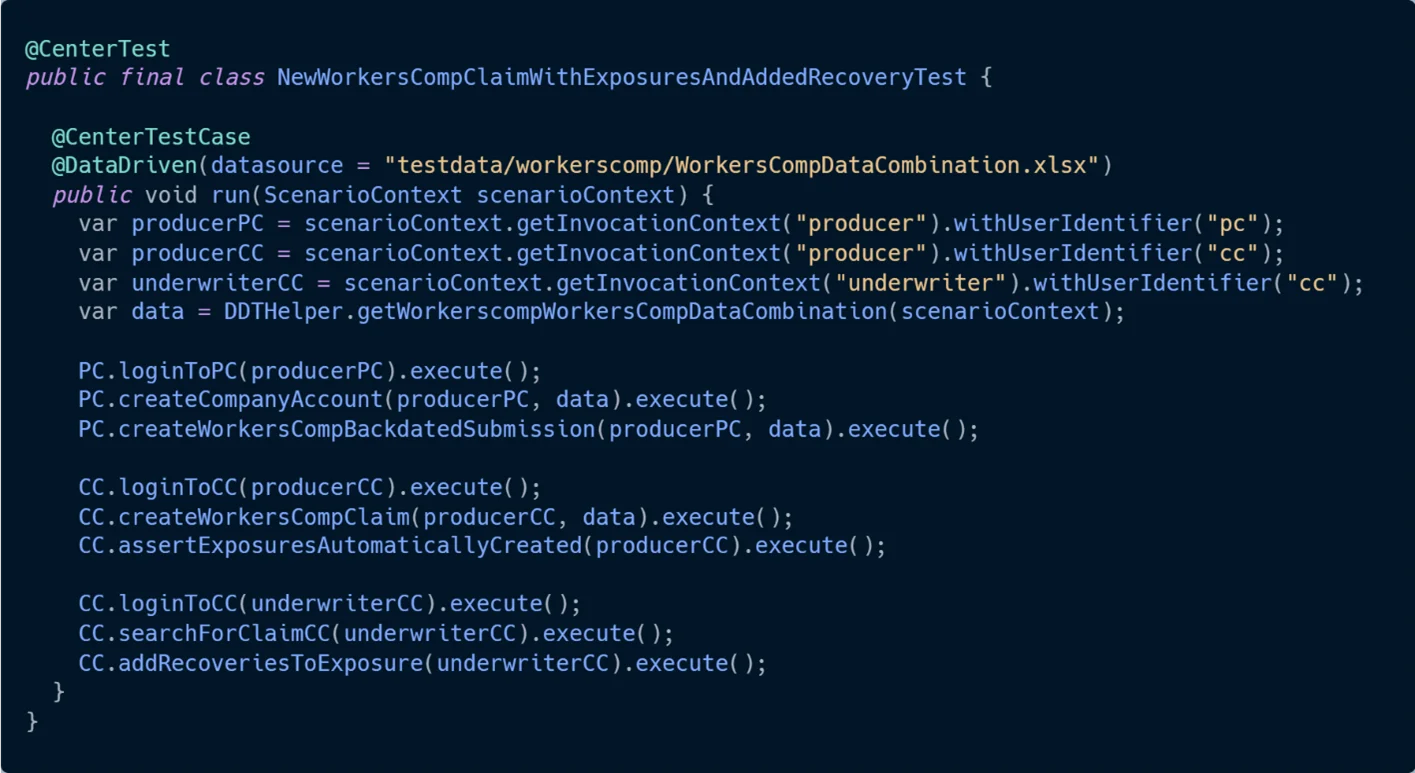
Complex, end-to-end, Workers Compensation OOTB CenterTest scenario.
Reusables
The power of multi-user/multi-session processing, like most other CenterTest features, lies not in its isolation but rather in its relationship to the entire framework. CenterTest Reusables, such as the BDD titled elements in the example above (beginning with PC., BC., and CC.) can be executed using any role with any permissions, in any combination, and contain Data Helpers for storing and transmitting stored data between sessions.
This dramatically speeds up test writing by allowing you to test the same flows with different permissions, in various combinations within a single test, and without changing your test code itself. We have an upcoming article in our Testing Guidewire series covering Reusables, but you can read a little more about our approach in Part Three of our Testing Guidewire Series: BDD and CenterTest Narratives (opens in a new tab).
Data Helpers: Communication between Users and Sessions
CenterTest's Data Helpers are the central mechanism that facilitate seamless communication between sessions by saving data in one session and for use in another session. This is crucial for scenarios where information needs to be passed between different users or systems to facilitate complex, realistic test scenarios.
In our example above, the Data Helper facilitates sharing the policy number and claim number across different users, sessions, and Centers, enabling the seamless, automated flow of information during test execution.
Information is passed to the Data Helper using a data key and retrieved using that same key; keys are unique and retain only the last value saved. If you utilize a test manager, the last stored value for each unique key is saved for later reference, whether for analysis, debugging, or when tests are restarted.
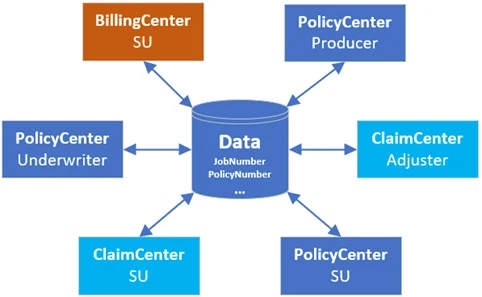
Data Helper Illustration with different user roles.
Predefined Data Keys
By default, there is a list of pre-defined data keys ready for use. These include Account Number, Policy Number, Claim Number, and others. Pre-defined keys are used to set and get values as needed.

Predefined data key for "claim number" storage and retrieval.
Custom Data Keys
With CenterTest, users can create custom data keys as needed if no predefined data key exists for a specific value. Then, these custom keys can be made saved and reused by simply extending the list of predefined data keys.

Custom data key for primary named insured "date of birth" storage and retrieval.
Let's refer back to the Workers Compensation test above to see how CenterTest's Data Helper facilitates Multi-User/Multi-Session testing. Note how Reusables are used which, as explained above, automatically save predefined data values.
PC.workersCompBackdatedSubmission() creates the policy which then stores the policy number.
CC.workersCompClaim() uses the stored policy number to retrieve the policy and create a claim against it then stores the claim number.
CC.searchForClaimCC() uses the claim number to find the claim.
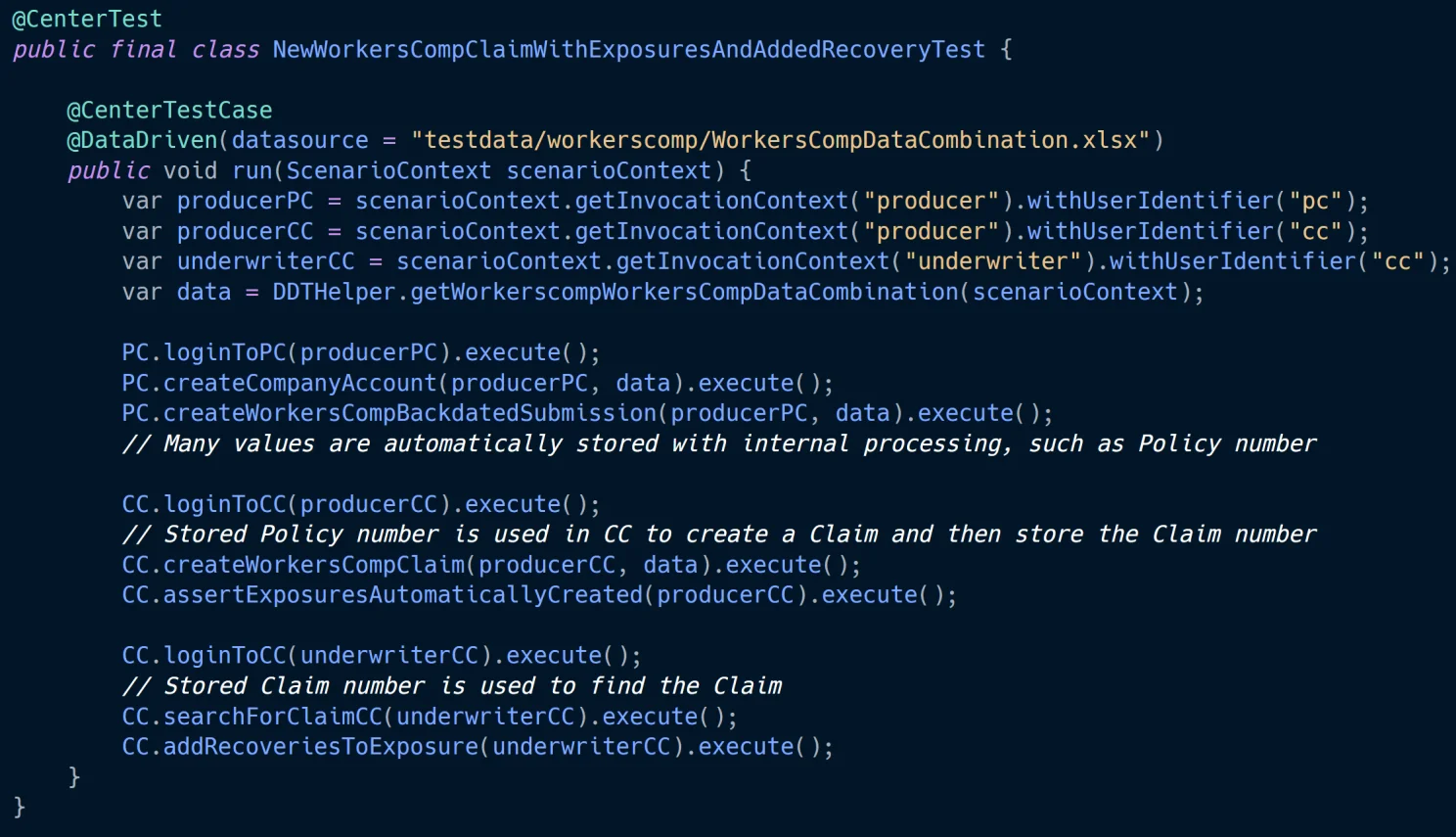
Note, you do not see the Data Helpers in the test code itself as they are built-in to the reusables.
Benefits of Data Helper:
Data Consistency: Ensures that all sessions are working with the same, up-to-date information.
Reduced Coupling: A test can share data from different sessions without direct dependencies, improving maintainability and decreasing manual intervention.
Realistic Scenarios: Allows for the simulation of complex workflows where information is passed between different users and systems.
Flexibility: Custom keys can be created on the fly to handle unique testing requirements.
Scalability: As tests grow more complex, Data Helper provides a standardized way to automatically manage and share increasing amounts of data.
Setting Us Apart
While Selenium and Playwright natively support multi-session functionality, Guidewire's GT framework, powered by TestCafe, does not (opens in a new tab). CenterTest supercharges Multi-User/Multi-Session by abstracting away your execution engine, supporting role-based processing, and enabling Data Helpers for easy in-test data management and reporting.
Key Differentiators:
Seamless Multi-user Support: CenterTest allows for easy definition and switching between user roles within a single test case.
Flexible Session Management: Our context-based approach allows for multiple sessions per user, enabling sophisticated test scenarios.
Cross-Center Testing: CenterTest supports end-to-end testing across multiple InsuranceSuite Centers and any other endpoints, replicating complex business processes.
Data Sharing between Sessions: CenterTest's Data Helpers facilitate communication between different sessions and users within a single test, allowing for realistic data flow during test execution.
Environment-agnostic Testing: By separating user configurations from test logic, tests can run across different environments without modification.
Conclusion
Multi-user/multi-session automated testing represents a significant leap forward in software quality engineering for Guidewire InsuranceSuite. By more accurately replicating real-world scenarios, you can deliver more reliable software, faster. As your system evolves and Guidewire releases Cloud updates, this approach is crucial for maintaining high quality standards and user satisfaction.
The ability to automate complex, multi-user workflows not only improves the effectiveness of your testing efforts, but also allows your development teams to move faster with confidence.
Stay tuned for upcoming installments in our Testing Guidewire series, where we will take a deeper dive into Role and Permission testing and CenterTest Reusables.
Want to learn more? Book a Demo
Special thanks to the Kimputing (opens in a new tab) team, Raivis Sarkovskis (opens in a new tab), Arkadiusz Frankowski (opens in a new tab), and Duncan Guignet, (opens in a new tab) for their contributions to this article.
If you missed the previous articles in our Testing Guidewire Series, you can catch up here:
Part 1: Designing for Testability
Part 3: BDD and CenterTest Narratives
Part 5: CenterTest: The Ultimate Solution for Guidewire Test Automation
Part 6: Simplifying Cloud Upgrades with Test Automation and TDD
Recent Updates


Explore CenterTest
Ready to elevate your QA practice?
Guidewire test automation,
- Guidewire test automation, that's easy to maintain.
- Guidewire test automation, in just two weeks.
- Guidewire test automation, future-proofed for cloud.